
PDF and Word (.docx) Guide
Here are some best practices to ensure optimal Chatbot results.
📝 Summary of best practices
- Avoid PowerPoint (portrait to landscape)
- Do not merge multiple documents into a single one!
- Respect formatting conventions: progressively larger font size depending on the title's importance, a single font size for the body text.
- Add structural elements: titles, table of contents.
- Ensure tables are clear: presence of lines between cells.
- Accompany images and screenshots with a description.
- Have a cover page with the document title in large font.
🔎 Some examples of well-structured documents
Documentation - M365 - Table of contents.pdf
Why is PDF sometimes difficult to process?
PDFs represent one of the main sources of knowledge that feed chatbots. Unfortunately, this document format is not easy to process because it contains no information about the structure of its content.
A classic file (.docx, .ppt, etc.) contains many structural elements: text blocks, tables, tables of contents, page numbers, headers and footers, etc. However, when converted to .pdf, all these elements are transformed into a block of text placed on a white page without any information about the nature of the element: paragraphs are just single-line blocks placed one below the other, titles are only blocks with special formatting (color, bold, etc.) without indication of their level, and tables are only small blocks separated by lines.
For a human, this poses no problem: we can visually interpret the text structure, but for a machine it is much more complicated, especially since the formatting of a document can take very (too) varied forms 🫠 !
How to improve my PDF's understanding by the chatbot?
To improve the document's understanding by the chatbot, it is necessary for the chatbot to understand its structure: sections, subsections, tables. The more obvious these elements are, the better the document can be processed and the better the chatbot can retrieve information from it! 🥳
It is therefore necessary to re-establish the structural elements of the PDF. Although this is not obvious, it is largely feasible if the PDF's structure is quite evident.
💡 Ultimately, even for us humans, a clear, structured document with a layout without too many frills is generally more pleasant to read and allows for faster retrieval of necessary information.
🛠️ The format
Some recommendations:
- prefer portrait orientation over landscape (i.e. Word over PowerPoint): portrait format documents often come from software whose main purpose is text editing (Word, Google Doc, etc.). These programs enforce a more intuitive reading direction (top-down and left-right). Even multi-column documents can be well understood. Conversely, software like PowerPoint allows for formatting documents that are more difficult to interpret: the reading order of a slide may be misunderstood by the chatbot, and therefore the text blocks on it may be read out of order. Additionally, the "PowerPoint" format encourages the addition of information difficult to interpret (graphs, diagrams) and superfluous elements (slide master, decorations).
- respect style formatting conventions: for example, it is commonly accepted that larger section titles mean the title is more important, or that an indented element belongs to the element preceding it (cf. table of contents).
- Have a cover page whose only textual element is the document's title, written in large font.
📝 The table of contents
The table of contents is an important element that indicates the document's structure. Beyond 2 pages, a document is supposed to be sectioned and therefore have a table of contents. To ensure it is well utilized by the chatbot, it is best to ensure it has a "classic" formatting:
- use automatic table of contents creation features: this is the best way to ensure that the format is well standardized and that page numbers are up to date. And it's faster than writing a table of contents by hand. 😉
- ensure the table has a "classic" format:
- titles of sections at the same level are well aligned
- titles of sub-sections are indented by one tab relative to the section they belong to.
- the title and page number are connected by a line of a common symbol (dot, dash)
- the page number is left-aligned
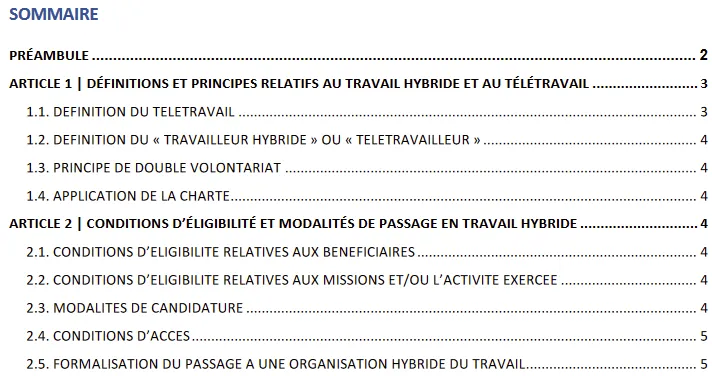
Example of a well-formatted table of contents
🗓️ Tables
Recent technological advancements have pushed the capacity of AI to understand tables 🦾. Fortunately, because they are sometimes indispensable for representing information. Nevertheless, they are not the ideal format for a chatbot, so having a table with a clearly apparent structure is always a plus.
Here are some examples of good and less good cases.
✅ The good ones
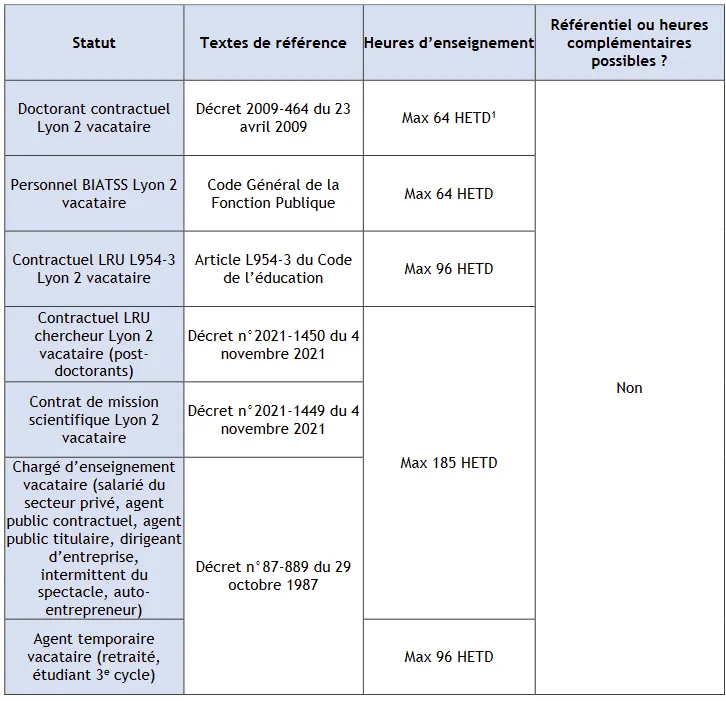
✅ The presence of merged cells could pose a problem. However, it is well supported as long as the lines are clearly visible.
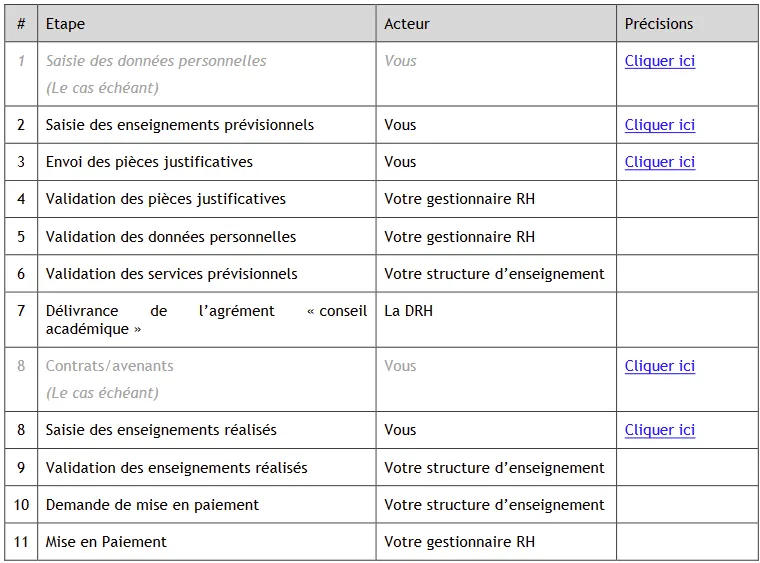
✅ The presence of lines allows for a good understanding of the structure. Column names are also present.
❌ The... less good ones
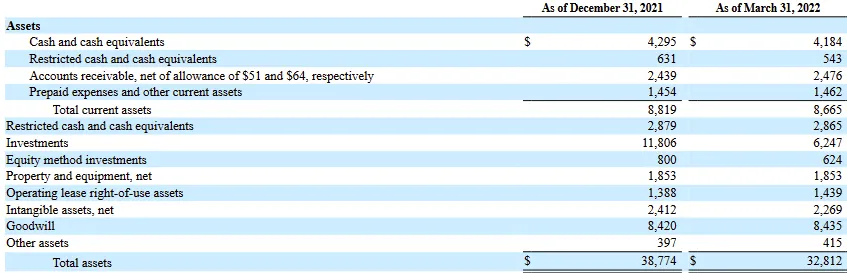
❌ Although this table may seem clear, its structure is not ideal. The lines are only suggested, one of the columns has no name, and the presence of the $ symbol only on certain lines is disturbing.
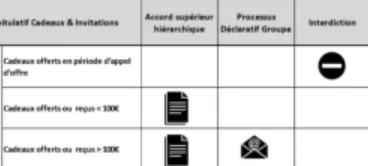
❌The meaning of images in a cell is difficult to understand. It is better to write the meaning.
🖼️ Images
Technology is progressing, and fast! But the interpretation of images by machines remains a real challenge, especially when they carry information difficult to interpret, such as graphs or screenshots.
To ensure that their information is not lost, it is better to accompany images with a caption that clearly describes their content. Even for a human, a caption is often essential for understanding a graph.
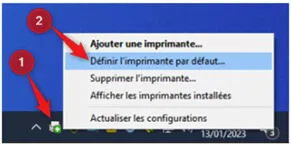 Example of an image requiring annotation, and its corresponding annotation.
Annotation:
Step 1: Right-click on the printer icon.
Step 2: Select "default printer"