
Matrix42 ITSM Connector
The Matrix42 connector uses the Matrix42 API and allows Wikit to connect to your Matrix42 instance, giving your users the ability to create and track their tickets from the Wikit Semantics chat.
Configuration
| Field name | Format / Type | Required | Comment |
|---|---|---|---|
| Matrix42 Instance URL | URL | ✅ | Base URL of your Matrix42 instance |
| Authentication Token | Password / Token | ✅ | Generated in Administration > Connections > Web Services Tokens |
| Account associated with the token | Free text | ➖ | Dedicated Wikit account recommended for tracking |
💡 Fields marked ✅ are required for the connector to work.
Setup
Generate an Authentication Token
In Matrix42, go to:
Administration → Connections → Web Services Tokens
Then create a new token and keep its value in a secure location.
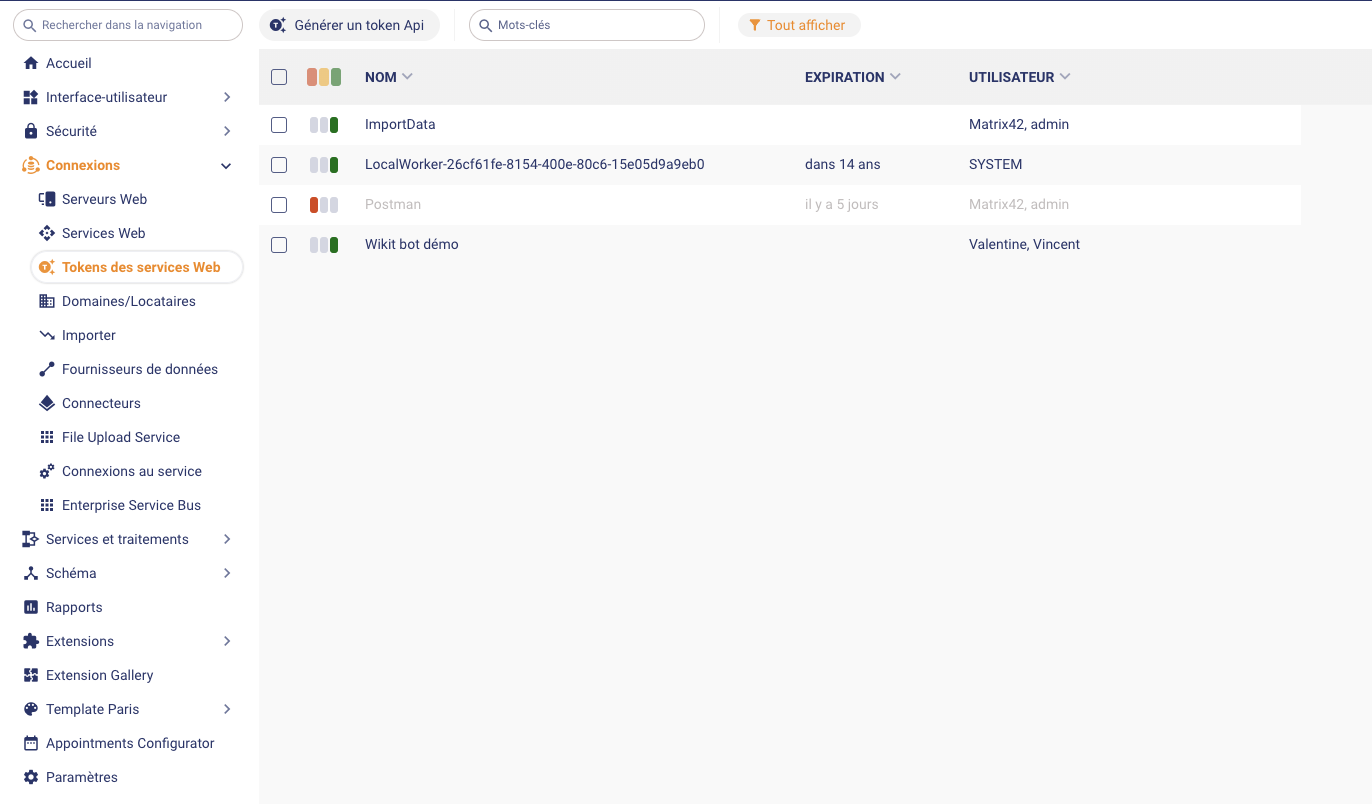
Matrix42 Documentation: Web Services tokens: Generate API Token
How the Connector Works
Ticket Creation
From the Wikit Semantics chat, users can create and track a Matrix42 ticket. The connector authenticates with the Matrix42 API using the token generated in Administration > Connections > Web Services Tokens.
Troubleshooting & FAQ
Does the token have an expiration date?
⚠️ Yes, you can choose the token's expiration date when generating it. Please notify the Wikit team before the deadline to prepare for its renewal.
Should I use a personal account to generate the token?
⚠️ No, the token is linked to the account that created it. For better action tracking, we recommend creating a dedicated
Wikitaccount rather than using a personal account.